BSNL-Softlayer issue

Seems like BSNL-NIB (AS9829) routing with Softlayer’s Singapore datacenter (AS36351) is messed up. Example route between BSNL consumer connection (from Haryana, India) to Softlayer hosted site dot19.com

1 router2 (192.168.1.100) [AS8151/AS28513] 3.136 ms 3.874 ms 4.675 ms
2 117.200.48.1 (117.200.48.1) [AS9829] 29.088 ms 32.395 ms 35.773 ms
3 218.248.173.42 (218.248.173.42) [AS9829] 42.411 ms 44.746 ms 47.176 ms
4 218.248.255.70 (218.248.255.70) [AS9829] 92.977 ms 95.322 ms 97.758 ms
5 64.213.76.69 (64.213.76.69) [AS3043] 323.921 ms 324.594 ms 327.478 ms
6 ix-20-0.tcore2.LVW-LosAngeles.as6453.net (209.58.53.9) [AS6453] 333.339 ms 302.673 ms 303.992 ms
7 if-8-2-1-0.tcore1.PDI-PaloAlto.as6453.net (64.86.252.114) [AS6453] 419.641 ms 423.086 ms 424.411 ms
8 if-2-2.tcore2.PDI-PaloAlto.as6453.net (66.198.127.2) [AS6453] 425.475 ms 426.956 ms 430.239 ms
9 if-9-2.tcore1.TV2-Tokyo.as6453.net (180.87.180.18) [*] 436.026 ms 433.594 ms 434.911 ms
10 180.87.180.50 (180.87.180.50) [*] 439.543 ms 438.330 ms 441.001 ms
11 ae7.bbr01.eq01.tok01.networklayer.com (50.97.18.162) [AS36351] 471.290 ms 446.401 ms 472.233 ms
12 ae1.bbr01.eq01.sng02.networklayer.com (50.97.18.165) [AS36351] 477.914 ms 480.721 ms 485.605 ms
13 ae5.dar01.sr03.sng01.networklayer.com (50.97.18.197) [AS36351] 499.273 ms 502.262 ms 501.499 ms
14 po1.fcr01.sr03.sng01.networklayer.com (174.133.118.131) [AS36351] 489.251 ms po2.fcr01.sr03.sng01.networklayer.com (174.133.118.133) [AS36351] 496.491 ms 497.322 ms
15 * * *
16 * * *
17 * * *
18 * * *

Messed up routing tables of BSNL or lack of co-ordination between Tata Comm & Softlayer?
Messed up connectivity of root servers in India

Today I was showing a good friend - how root servers are working and how they are connected. I was explaining him anycasting and gave example of k-root node which is hosted in Delhi by niXi i.e National Internet Exchange of India. I was totally stunned to find traceroute result to anycasting based block of k-root-node hosted in Delhi from my BSNL connection. Checkout traceroute here.

It seems like BSNL has gone totally wild in listening to announcements for 193.0.14.0/23 via ASN 25152 which is of  RIPE-NCC-K-ROOT nodes.

Completed IPv6 Certification from Hurricane Electric

Just now completed IPv6 certification with Hurricane Electric. It was very much fun!

IPv6 Certification Badge for anuragbhatia

Starting was pretty much simple and basic, followed by email server running on v6 - which also I was doing already. I was stuck at most unexpected part - when I had to setup IPv6 based DNS servers. My first reaction was - that’s so simple….later on realized that system was just not accepting my entry and kept on giving error with AAAA records. Then suddenly I realized that I missed creating AAAA at DNS servers, but created only glue records which was causing issue. Created AAAA and that also went smoothly + glue helped me in final test too.

openDNS performing better in India now!

Hello everyone!

Seems like Tata Communications routing table is changed (call it fixed) to route traffic for openDNS to Singapore. It’s not going to London anymore and I see very good latency from BSNL too (which uses Tata Comm for most of it’s International traffic).

Here’s latest routing from BSNL to openDNS: 

HOST: laptop                                                                 Loss%   Snt   Last   Avg  Best  Wrst StDev

  1. router2                                                                        0.0%    50    2.0   1.7   1.5   2.2   0.2

  2. 117.207.48.1                                                             2.0%    50   25.4  26.2  24.5  36.1   1.6

  3. 218.248.173.38                                                        0.0%    50   26.1  31.2  25.0 125.5  17.8

  4. 121.244.68.114.static-lvsb.vsnl.net.in               2.0%    50   70.1  72.2  69.4  97.8   6.0

  5. 172.31.61.210                                                            0.0%    50   92.9  94.8  92.9 109.0   2.2

  6. ix-4-2.tcore1.CXR-Chennai.as6453.net            0.0%    50   94.3  98.4  93.1 154.6  12.6

  7. if-5-2.tcore1.SVW-Singapore.as6453.net          0.0%    50  127.2 130.6 125.8 165.5   8.5

  8. if-2-2.tcore2.SVW-Singapore.as6453.net         0.0%    50  126.8 128.6 124.4 178.2   8.3

  9. Vlan1807.icore1.SVQ-Singapore.as6453.net   2.0%    50  135.4 132.3 126.1 140.4   4.4

 10. 203.208.186.101                                                      0.0%    50  202.4 163.6 156.9 256.5  17.5

 11. 203.208.153.110                                                       0.0%    50  159.1 166.8 157.0 272.4  23.6

 12. 203.208.190.166                                                      2.0%    50  160.3 160.6 158.6 191.9   4.6

 13. resolver1.opendns.com                                           2.0%    50  159.0 158.3 156.9 162.4   1.0

Overall I am getting latency from 160ms which seems OK considering 25-30ms latency for DSL, adding 60-90ms for route till South India followed by 30-40ms latency between Chennai and Singapore and eventually destination openDNS node on ASN 36692. 

Dots in a hostname

Yesterday I had a very interesting discussion with our senior administrator.

I was configuring reverse DNS records for our /24 block and I decided to use format - IP.static.domain.com thus if for IP 1.2.3.4, I pointed reverse DNS (PTR) to 1.2.3.4.static.domain.com

When I got chance to show my work to my senior administrator, he said - It’s wrong to use 1.2.3.4.static.domain.com in a hostname. Too many dots will make DNS resolution very slow (forward - reverse - again forward). And I should have used 1-2-3-4.static.domain.com

EIG cable in action!

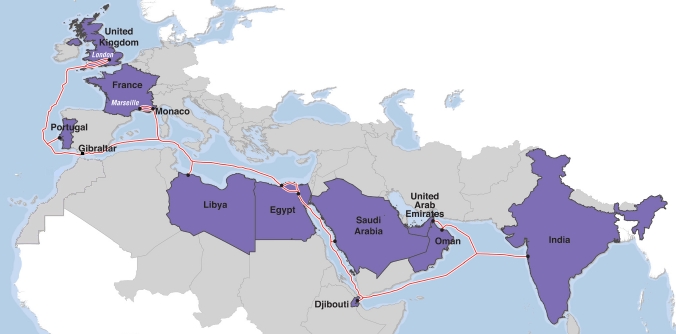
And here we get latest EIG cable i.e Euro India Gateway cable in action. Although cable was up few months back, but it’s now we are getting some changes in routing table up. (Probably earlier was test mode?).

Here’s a map of EIG cable.

This was very interesting project because of few reasons - firstly it is one (of few) cable consortium’s where India’s biggest State owned telco BSNL (also known as NIB - National Internet Backbone). Apart from that, it is one of direct link between India and UK. Earlier main route was from Mumbai to France (VSNL-Tata route) and next domestic Europeon bones Lamdanet, Telia, Level3 etc used to carry data further.

Ubuntu 11.04 - additional mirror

And Ubuntu 11.04 released yesterday.

I will do a seperate blog post reviewing Ubuntu 11.04 specially the new Unity interface, but for now I am trying to help Linux community by additonal mirror.

Incase you are going to download Ubuntu - I would encourage you to use this mirror for Asian and European region.

http://server7.anuragbhatia.com/Ubuntu/11.04/release/

Update: Mirror has been removed as of now. author: “Anurag Bhatia” url: “/2011/04/web-hosting/ubuntu-11-04-additional-mirror/”

Keep spreading the Linux! :)

What is 4G?

I can see heavy confusion on what is 4G? So thought to make a blog post about it.

Some people even feel like….

:) Let’s try to understand from basic definition about 4G.

As per ITU - 4G refers to wireless technologies which gives as fast as 1Gbps speeds when one is stationary, while 100Mbps speeds when one is on move. That’s it. Full stop.


1Gbps!!! Really?

Well, that’s “just in defination”. In real - there is no technology which is real 4G.

Which DNS resolver is good for you?

Which DNS resolver is better - ISP’s (default) DNS resolver, or Google Public DNS or the pioneer of DNS openDNS or even a local DNS server?

Let’s try to find out! I am sitting on a BSNL data link, and I will try to perform few tests to find that out: Available DNS resolvers to me:

  1. BSNL DNS resolvers - 218.248.255.194 & 218.248.255.196
  2. Google Public DNS - 8.8.8.8 & 8.8.4.4
  3. OpenDNS - 208.67.222.222 & 208.67.220.220
  4. Local DNS Server - BIND running on localhost - 127.0.0.1

Observing ping time:

BSNL DNS resolver:

--- 218.248.255.194 ping statistics ---

5 packets transmitted, 4 received, 20% packet loss, time 4001ms

rtt min/avg/max/mdev = 26.978/27.754/29.122/0.897 ms

--- 218.248.255.194 ping statistics ---
5 packets transmitted, 4 received, 20% packet loss, time 4001ms
rtt min/avg/max/mdev = 26.978/**27.754**/29.122/0.897 ms

Google Public DNS:

--- 8.8.8.8 ping statistics --- 5 packets transmitted, 
5 received, 0% packet loss, 
time 4001ms rtt min/avg/max/mdev = 121.147/121.878/122.951/0.783 ms

OpenDNS:

--- 208.67.222.222 ping statistics ---

5 packets transmitted, 5 received, 0% packet loss, time 4005ms

rtt min/avg/max/mdev = 217.678/**219.528**/222.034/1.717 ms

Next, localhost? :)

Experience with MNP in Haryana

Recently lucky mobile users in Haryana got MNP i.e Mobile Number Portability.

I too ported my number out from Airtel to Tata Docomo. Reason remains the super slow GPRS network (yup gprs, not even upgraded to EDGE in most of Haryana) and crazy service activation followed by irritating sms’es.


Here’s my experience with MNP:

It took around 20 days in porting of my number, and technically speaking - process is yet not (hundred percent) completed even after a month! One of the problems with system is that whenever one requests for a porting code, it is valid for 15days. If we request for porting code again (via sms) we get same code, with same validity. In my case, I request for code, but I submitted documents for porting after 13days of my initial request. On the day of submission, I requested for code again, and got same code which was expiring after 2days. I did informed retailer about it, but he had no clue. Eventually I submitted form. Next, documents reached company by 16th (or to the middle guy), and they triggered request for porting on 16th day with same old code. Result: Port out request failed, because porting code was expired! It took me over a week to realize that, and eventually I submitted documents again. I submitted documents on Monday, and on a fine thursday evening I realized that I didn’t got any call or sms that day! Later, I found I was even not able to send any sms. Outgoing calls were going fine via Airtel connection. I got clue, and tried using Tata Docomo sim card, and it worked! All was OK other then fact that I was not able to recieve calls from Airtel users on Tata’s sim. Callers were getting message - “The Airtel number you have dialed is switched off!” At this point of time I realized a big problem - due to some bugs in system, new carrier actually accepted my number, while Airtel has yet not ported out my number. Good was that I started getting calls even from Airtel users within a day. Logically speaking all was going OK, other then fact that my Airtel connection still works for outgoing, and even at the time of blogging (after a month of porting) it’s still up! Tata Docomo customer support has no clue about it while Airtel support always requests me to visit Airtel relationship center to get this fixed. (Why really? Can’t they do this ONLINE?!)