Opentofu + Tailscale = Bootstrapped DevOps environment with VPN
For the last few days, I have been playing with OpenTofu. For those who may not know, it’s a fork of last Terraform as Terraform’s license was changed due to IBM’s acquisition of Hashicorp and is a Cloud Native Foundation project. It can be used to quickly deploy (and remove) resources from various cloud players.
Yesterday came across this tweet from Tailscale about tailscale’s module for deployment.
Cloud-init can be tough, and we've heard all about it. So we built an open-source Terraform module, one that helps provide a more consistent Tailscale experience across AWS, Azure, GCP, and everywhere. No more surprises, OS quirks, or other mysteries: https://t.co/vn1ITU7Fgz pic.twitter.com/stcF6WuiD7
— Tailscale (@Tailscale) January 15, 2026
It’s cool and useful, though I find Cloud init way more useful since for me these tools are more useful for quick testing rather than a permanent production server. The idea of tailscale on devops VMs as they come up is pretty powerful, as it takes care of the private network between these machines, plus underlay doesn’t matter, and hence one can use (cheaper) IPv6-only VMs.
An example of OpenTofu config (which is similar to Terraform) to deploy three IPv6 only servers on players like Hetzner across Nuremberg, Helsinki, and Ashburn:
main.tf
terraform {
  required_providers {
    hcloud = {
      source  = "hetznercloud/hcloud"
      version = "~> 1.59.0"
    }
  }
}

provider "hcloud" {
  token = var.hcloud_token
}


data "hcloud_ssh_key" "desktop" {
  name = "desktop"
}

data "hcloud_image" "ubuntu" {
  name   = "debian-13"
  most_recent = true
}

resource "hcloud_server" "vms" {
  for_each = var.vms

  name        = each.key
  image       = data.hcloud_image.ubuntu.id
  server_type = each.value.server_type
  location    = each.value.location
  ssh_keys    = [data.hcloud_ssh_key.desktop.id]

  user_data = <<-EOF
    #cloud-config
    package_upgrade: true
    packages:
      - curl
    runcmd:
      - curl -fsSL https://tailscale.com/install.sh | sh
      - tailscale up --authkey=${var.tailscale_authkey} --accept-routes
  EOF

  public_net {
    ipv4_enabled = false
    ipv6_enabled = true
  }

  labels = {
    managed-by = "opentofu"
  }

  lifecycle {
    ignore_changes = [user_data]
  }
}

output "vm_ips" {
  value = { for k, vm in hcloud_server.vms : k => vm.ipv6_address }
}
variables.tf (to hold non-secret variables)
variable "hcloud_token" {
  description = "Hetzner Cloud API Token"
  type        = string
  sensitive   = true
}

variable "vms" {
  description = "Map of VMs with locations"
  type = map(object({
    location    = string
    server_type = optional(string, "cx23")
  }))
  default = {
    devops01 = { location = "nbg1" }
    devops02 = { location = "ash", server_type = "cpx11" }
    devops03 = { location = "hel1" }
  }
}

variable "tailscale_authkey" {
  description = "Tailscale Auth key"
  type        = string
  sensitive   = true
}
terraform.tfvars (to hold secret variables)
hcloud_token = "XXX"
tailscale_authkey = "tskey-auth-XXXXXX"
Triggering machines (with VPN built in)
Initiating (to install providers, initiate backend etc)
anurag@desktop ~/R/P/c/a/test (main)> tofu init

...

anurag@desktop ~/R/P/c/a/test (main)>
And the deployment!
anurag@desktop ~/R/P/c/a/test (main)> tofu apply
data.hcloud_image.ubuntu: Reading...
data.hcloud_ssh_key.desktop: Reading...
data.hcloud_ssh_key.desktop: Read complete after 0s [name=desktop]
data.hcloud_image.ubuntu: Read complete after 0s [name=debian-13]

OpenTofu used the selected providers to generate the following execution plan. Resource actions are indicated with
the following symbols:
  + create

OpenTofu will perform the following actions:

  # hcloud_server.vms["devops01"] will be created
  + resource "hcloud_server" "vms" {
      + allow_deprecated_images    = false
      + backup_window              = (known after apply)
      + backups                    = false
      + datacenter                 = (known after apply)
      + delete_protection          = false
      + firewall_ids               = (known after apply)
      + id                         = (known after apply)
      + ignore_remote_firewall_ids = false
      + image                      = "310554929"
...
...

Plan: 3 to add, 0 to change, 0 to destroy.

Changes to Outputs:
  + vm_ips = {
      + devops01 = (known after apply)
      + devops02 = (known after apply)
      + devops03 = (known after apply)
    }

Do you want to perform these actions?
  OpenTofu will perform the actions described above.
  Only 'yes' will be accepted to approve.

  Enter a value: yes

hcloud_server.vms["devops02"]: Creating...
hcloud_server.vms["devops01"]: Creating...
hcloud_server.vms["devops03"]: Creating...
hcloud_server.vms["devops01"]: Still creating... [10s elapsed]
hcloud_server.vms["devops03"]: Still creating... [10s elapsed]
hcloud_server.vms["devops02"]: Still creating... [10s elapsed]
hcloud_server.vms["devops01"]: Creation complete after 19s [id=117722922]
hcloud_server.vms["devops02"]: Still creating... [20s elapsed]
hcloud_server.vms["devops03"]: Still creating... [20s elapsed]
hcloud_server.vms["devops02"]: Creation complete after 26s [id=117722920]
hcloud_server.vms["devops03"]: Still creating... [30s elapsed]
hcloud_server.vms["devops03"]: Creation complete after 35s [id=117722921]

Apply complete! Resources: 3 added, 0 changed, 0 destroyed.

Outputs:

vm_ips = {
  "devops01" = "2a01:4f8:1c1f:88df::1"
  "devops02" = "2a01:4ff:f0:7df7::1"
  "devops03" = "2a01:4f9:c013:f6e0::1"
}
anurag@desktop ~/R/P/c/a/test (main)>
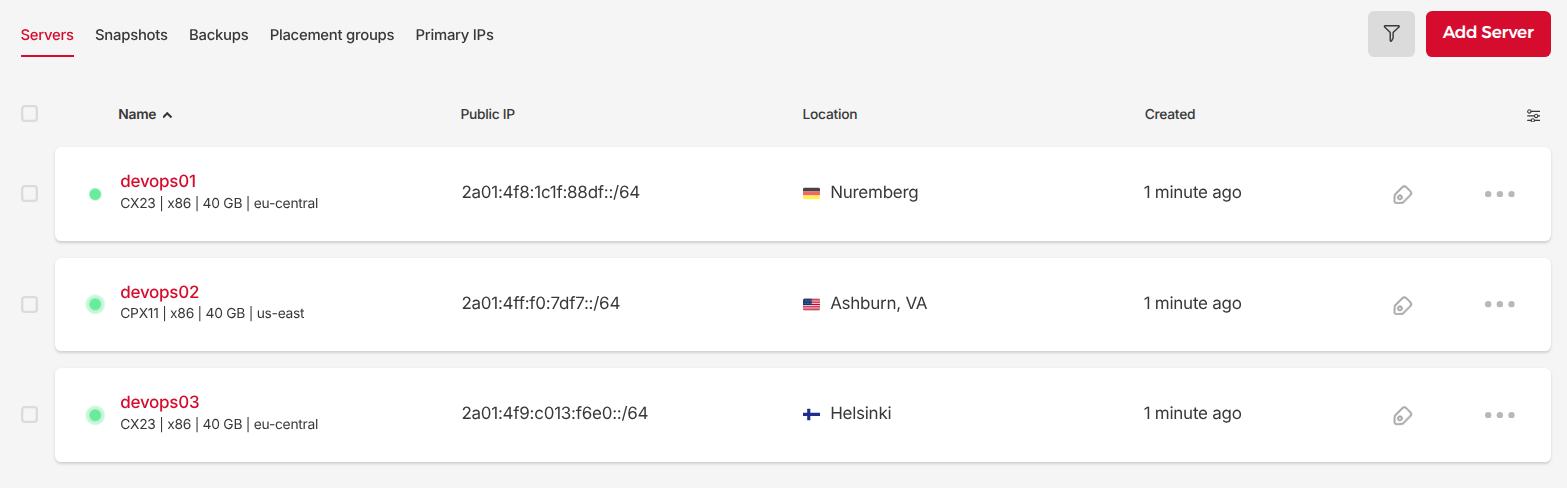
In the Hetzner console for this project, three VMs appear:
Reaching devops01 -> devops02
root@devops01:~# tailscale ping devops02
pong from devops02 (100.68.146.42) via [2a01:4ff:f0:7df7::1]:41641 in 111ms
root@devops01:~#

root@devops01:~# ping -c 5 devops02
PING devops02.tail362a2.ts.net (100.116.50.72) 56(84) bytes of data.
64 bytes from devops02.tail362a2.ts.net (100.116.50.72): icmp_seq=1 ttl=64 time=106 ms
64 bytes from devops02.tail362a2.ts.net (100.116.50.72): icmp_seq=2 ttl=64 time=106 ms
64 bytes from devops02.tail362a2.ts.net (100.116.50.72): icmp_seq=3 ttl=64 time=106 ms
64 bytes from devops02.tail362a2.ts.net (100.116.50.72): icmp_seq=4 ttl=64 time=106 ms
64 bytes from devops02.tail362a2.ts.net (100.116.50.72): icmp_seq=5 ttl=64 time=106 ms

--- devops02.tail362a2.ts.net ping statistics ---
5 packets transmitted, 5 received, 0% packet loss, time 4006ms
rtt min/avg/max/mdev = 105.735/106.012/106.243/0.197 ms
root@devops01:~#
It can reach devops02 over IPv6 transport.